Voice, vision, cameras, and connected devices — brought together in one intelligent Terminal experience. Nova 5.2 is being tested privately with independently enrolled Windows and iPad Terminals.
Physically demonstrated acrossWindows PC · iPad · iPhone
THE REAL NOVA TERMINALINTERACTIVE WEBSITE PREVIEW
NOVAAI ASSISTANT NOVATONOMY
WEBSITE DEMO
EQ · INPUT
NOVA
Meet Nova. We've unlocked a few of her features for you to explore.
Try her live microphone EQ and watch her respond to your voice.
Your privacy matters. Microphone audio stays on your device. It's never recorded, stored, or transmitted to us.
— Nova
Ask Nova anything…
EQ OFF · microphone off
Stopped — press ENABLE
Live website controls: EQ and shared KILL / ENABLE. Other controls are a product preview. Microphone audio stays on your device; it is never recorded or transmitted.
Working software, on real hardware.Native Terminal preview · local microphone EQ.
DOWNLOAD NOVA
Your Terminal. Your next step.
Choose the Nova Terminal for your device. The future Local Server is a separate package. Beta access is issued by your administrator; enrollment and authorization still apply.
INVITED TESTERS ONLY
Nova Terminal — Beta 5.2
Conversation, cameras and trusted Nova Link collaboration, with Client and Terminal permissions managed by Nova Admin.
Windows Terminal
Public Beta 5.2 installer pending verification.
The working in-house Beta currently uses administrator-provided browser access. A historical Windows installer is not a verified Beta 5.2 release.
iPhone installation guidance
Ask your administrator for the approved Beta address and enrollment instructions. Preserve any required access code.
Use the same Safari context throughout setup. Enter only the administrator-issued Terminal UUID and PIN, then verify the correct Client, ESN and ENROLLED status.
For a Home Screen shortcut, follow your administrator's approved Safari Share → Add to Home Screen procedure. Keep the original enrolled browser context; another browser or profile has separate storage.
Commercial iPhone Home Screen acceptance is pending. The separately proven F87 reference uses Safari as the default browser and Open as Web App OFF; this does not establish the same result for every Beta route.
iPad installation guidance
Open the approved Beta address in the browser context selected for your Terminal. Use your administrator's access and enrollment instructions.
Verify the assigned Client, ESN and UUID after enrollment. Keep that browser context for close/reopen and future sessions; changing profiles does not move its identity.
A Safari Home Screen shortcut is a separate acceptance step. Follow the administrator's approved launch settings and confirm the same identity after opening the shortcut.
iPad browser operation is physically demonstrated in the private Beta. Commercial Home Screen distribution remains pending; no native App Store release is offered.
No automatic activation. Public installer and commercial mobile links will be enabled only after verification. This site does not grant access to the protected F87 reference.
RELEASE ON HOLD
Nova Local Server
A Windows-based Friends & Family Beta installation package for authorized Client Local Servers.
Local Nova service hosting.
Client-managed ZowieBox and compatible camera configuration.
Local MediaMTX / FFmpeg video processing.
Local recording and media storage.
Multiple authorized Nova Terminals.
Secure communication with central Nova Admin.
Local Server downloads are paused for security review.
No installer is currently offered for download. Distribution will remain paused until the package review is complete and the owner approves a new release.
Downloading or installing grants no operating authority. Your administrator must complete Client enrollment, signed authorization and trusted local HTTPS setup before RUN. KILL and equipment-output restrictions remain enforced. The installer starts no services or capture automatically.
THE VISION BEHIND NOVA
Software today. A broader vision ahead.
The real Nova Terminal is the current product experience. Robotics is a future platform direction, illustrated by the original concept artwork.
This concept is preserved as part of NovatonomyAI's vision. It is not a claim that a robot or Local Server installer is available today.
FUTURE ROBOT CONCEPTIN DEVELOPMENT
Future robot platform · in developmentSupplied concept artwork. Nova 5.0 today is a multi-terminal software prototype. Organization references in the artwork do not imply endorsement.
01 Talk naturally.
02 See the work.
03 Stay connected.
MEET YOUR AI COWORKER
Useful assistance. Right where the work happens.
Nova is designed to work alongside people, bringing conversation, visual information, and human collaboration into the same workspace.
Ask a question, share what you see, or connect with a coworker at another Nova terminal. Move between AI assistance, telepresence, and useful project context as the task changes.
Nova 5.2 is being physically tested as a private Multi-Client Beta. Public installation and commercial availability remain subject to verification; this is not a general product launch.
This demonstration shows an early NovatonomyAI prototype operating in a real-world environment. Nova combines conversational AI, visual awareness, connected terminals and application interaction as we continue developing the AI coworker platform.
Where Artificial Intelligence Meets the Physical World
See more. Connect more. Control more.
Nova is more than a conversational AI assistant. She's designed to connect intelligence with real-world equipment, bringing live video, connected devices, and industrial automation into one unified Terminal experience.
From monitoring security cameras and receiving aerial drone video to integrating programmable logic controllers, NovatonomyAI is developing a practical bridge between artificial intelligence and the physical systems around us.
LIVE VIDEO INTEGRATION
Bring Your Cameras Into Nova
Powered by ZowieBox and Nova Remote Camera
Imagine opening your AI assistant and viewing live video from your existing security cameras, industrial equipment, or remote locations—without switching between multiple applications.
Nova's Remote Camera capability is designed to bring compatible video sources directly into the Nova Terminal.
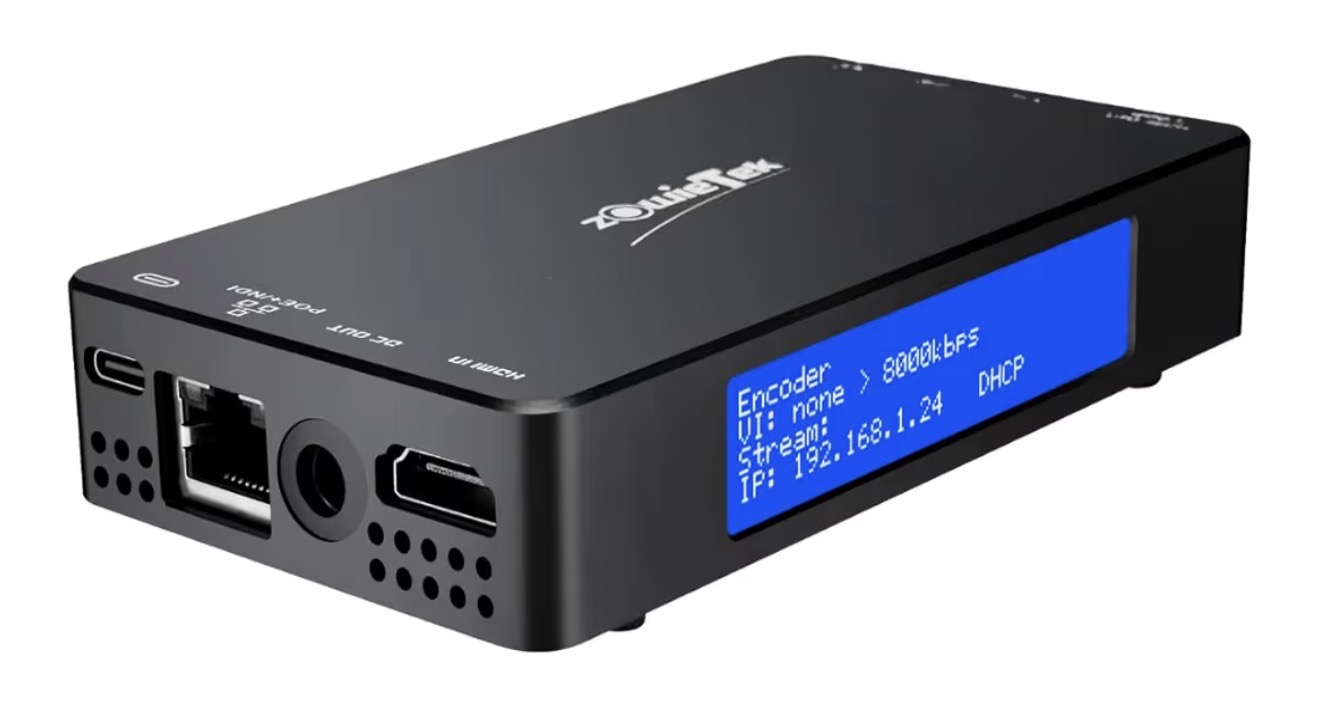
Using devices such as the ZowieBox HDMI video encoder, Nova can receive video from compatible HDMI equipment and make it available through her integrated viewing interface.
One Terminal. Multiple Video Sources.
Zowietek ZowieBoxOwner-supplied HDMI encoder/decoder reference. Compatibility depends on the source equipment and configuration.Manufacturer reference ↗
Key Capabilities
Live video from compatible HDMI capture and encoding equipment.
Integration with supported network camera streams.
Multiple camera and video-source selections.
WebRTC and HLS playback options.
Local video processing using FFmpeg and MediaMTX.
Recording and playback capabilities where supported.
Authorized viewing across connected Nova Terminals.
From Video Equipment to Nova
HDMI Video Source → ZowieBox → Network → Nova Server → Nova Terminal
Nova's architecture allows supported video streams to be processed locally and presented to authorized users.
Potential applications include facility security, industrial monitoring, equipment observation, remote operations, and connected workspaces.
Real video. Real equipment. One intelligent interface.
Compatibility, latency, stream availability and recording capabilities depend on the connected equipment and deployment configuration.
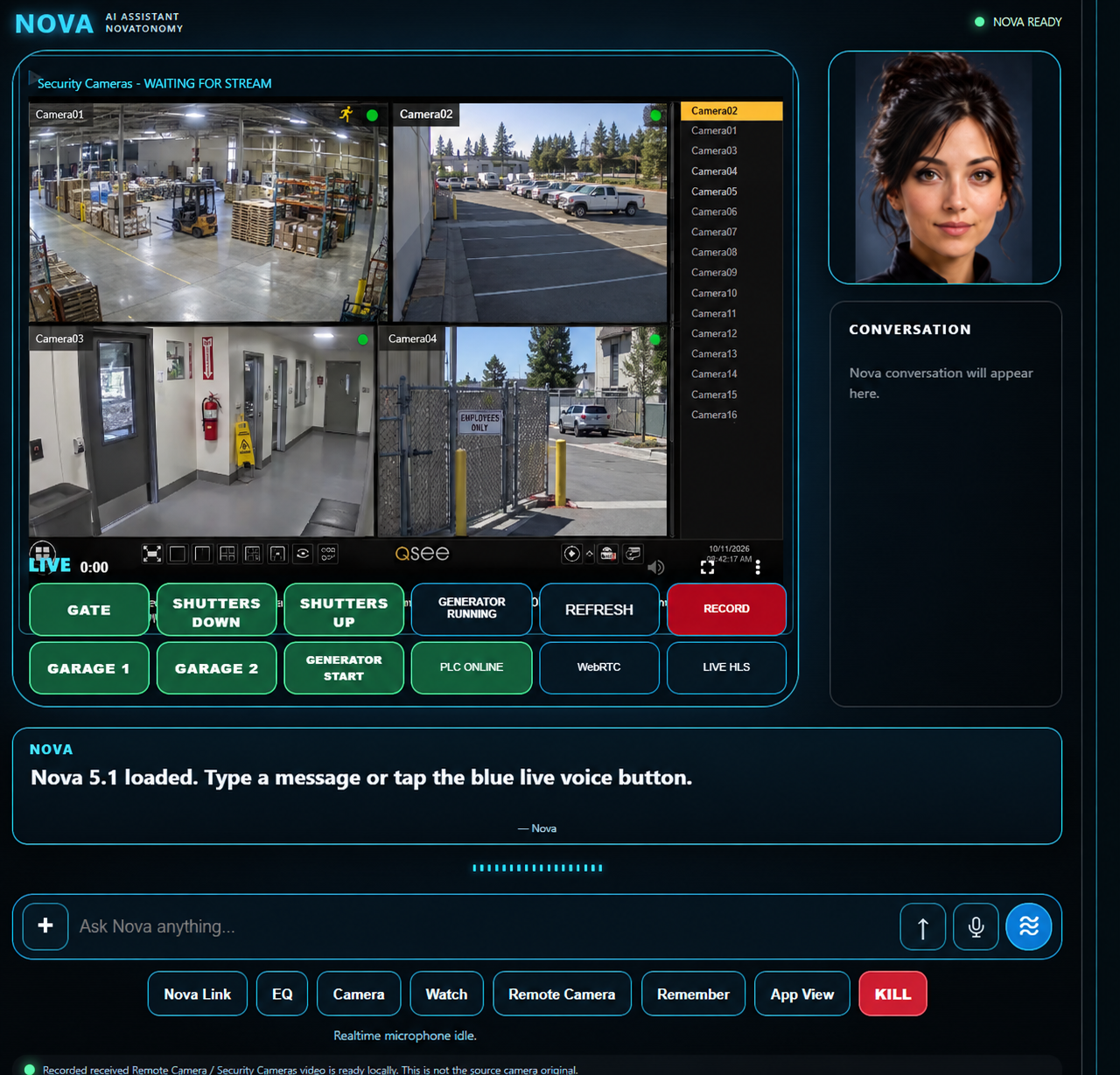
Nova Remote Camera — Illustrative commercial facility video integration.Illustrative commercial security-camera composite. Not footage from a commercial customer.
DRONE VIDEO INTEGRATION
Bring Live Aerial Video Into Nova
RTMP Streaming + Nova Remote Camera
A New Perspective. The Same Intelligent Terminal.
Imagine launching a drone, activating its live video stream, and viewing that aerial perspective directly inside your Nova Terminal.
Nova's Remote Camera architecture is designed to receive compatible RTMP video streams from supported drones and their associated controllers or streaming applications.
By bringing aerial video into the same interface used for security cameras, equipment monitoring, and AI assistance, Nova extends connected visibility beyond fixed locations.
From the Ground to the Sky. One Nova Terminal.
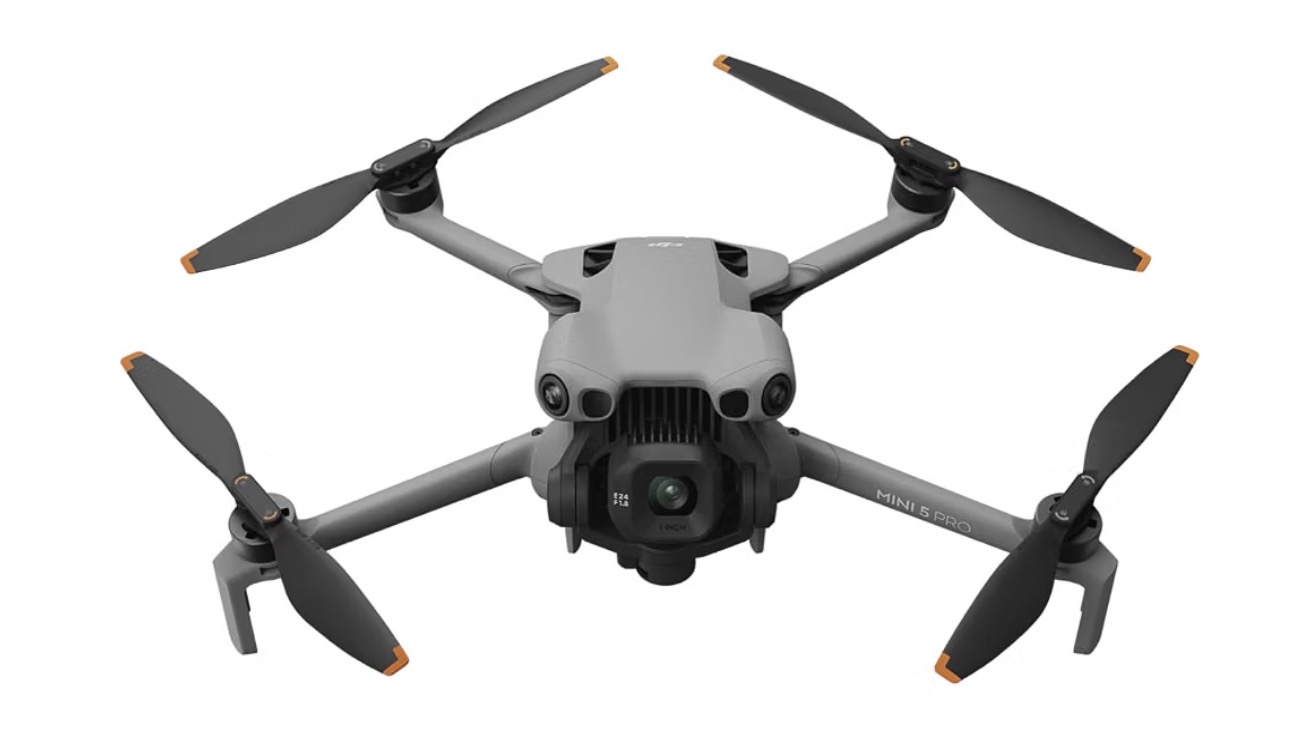
DJI Mini 5 Pro · Reference imageIllustrative aircraft reference. Nova streaming support for a specific aircraft/controller combination requires validation.Manufacturer reference ↗
NOVAAERIAL VIDEO CONCEPT
Illustrative industrial aerial inspection scene · Conceptual Nova video presentation. No live feed or flight control.
Compatible Drone Streaming
Nova's RTMP-based video architecture can support compatible streaming outputs from major drone manufacturers, including equipment from:
DJI — supported aircraft/controller combinations offering RTMP live streaming.
Autel Robotics — supported models and controller/software configurations.
Parrot — compatible aircraft or ground-control applications with RTMP output.
Other manufacturers — drones and companion applications capable of publishing compatible RTMP streams.
Compatibility depends on the specific drone, controller, firmware, application, and available streaming protocols. Not every model from these manufacturers provides native RTMP output.
How It Works
Drone Camera → Drone Controller / Streaming App → RTMP → Nova Server → Nova Terminal
When supported by the equipment, the drone's live video is transmitted through an RTMP connection to Nova's configured video infrastructure.
Nova can then make the stream available to authorized Terminals through compatible playback methods, including WebRTC and HLS.
This approach builds on Nova's existing MediaMTX and FFmpeg video architecture.
Key Capabilities
Receive compatible live drone video through RTMP.
Present aerial video inside Nova Remote Camera.
Select between authorized drone and fixed-camera sources.
Support local stream processing and compatible playback formats.
Make supported streams available to authorized linked Terminals.
Support recording of received video where configured and permitted.
Combine aerial visibility with other Nova Terminal information.
Real-World Applications
Infrastructure Inspection
View aerial footage of bridges, buildings, towers, rooftops, and other infrastructure from a connected Terminal.
Facility and Property Monitoring
Add mobile aerial perspectives to existing fixed-camera monitoring systems.
Industrial Site Observation
Observe equipment locations, work areas, and site conditions from above.
Emergency and Incident Assessment
Support authorized personnel with aerial situational awareness where drone operations are permitted.
Remote Operations
Allow authorized Nova Terminals to view supported live drone streams across configured network connections.
Video Integration, Not Flight Control
Nova's drone integration is focused on receiving, displaying, and managing compatible video streams.
It does not automatically provide drone flight control, autonomous navigation, or access to aircraft safety systems.
Drone operation remains under the authority of the designated pilot and the manufacturer's approved flight-control system.
The drone flies. Nova brings the view together.
Drone streaming availability depends on aircraft and controller compatibility, network connectivity, firmware, and streaming configuration. Latency and image quality vary. Drone video integration is an architectural capability; specific manufacturer/model support and commercial availability require validation.
INDUSTRIAL AUTOMATION INTEGRATION
Connect Nova to the Machines Around You
Waveshare Industrial Networking + PLC Integration
Nova's development roadmap extends beyond displaying information. We're building pathways for her Terminal to communicate with industrial automation systems.
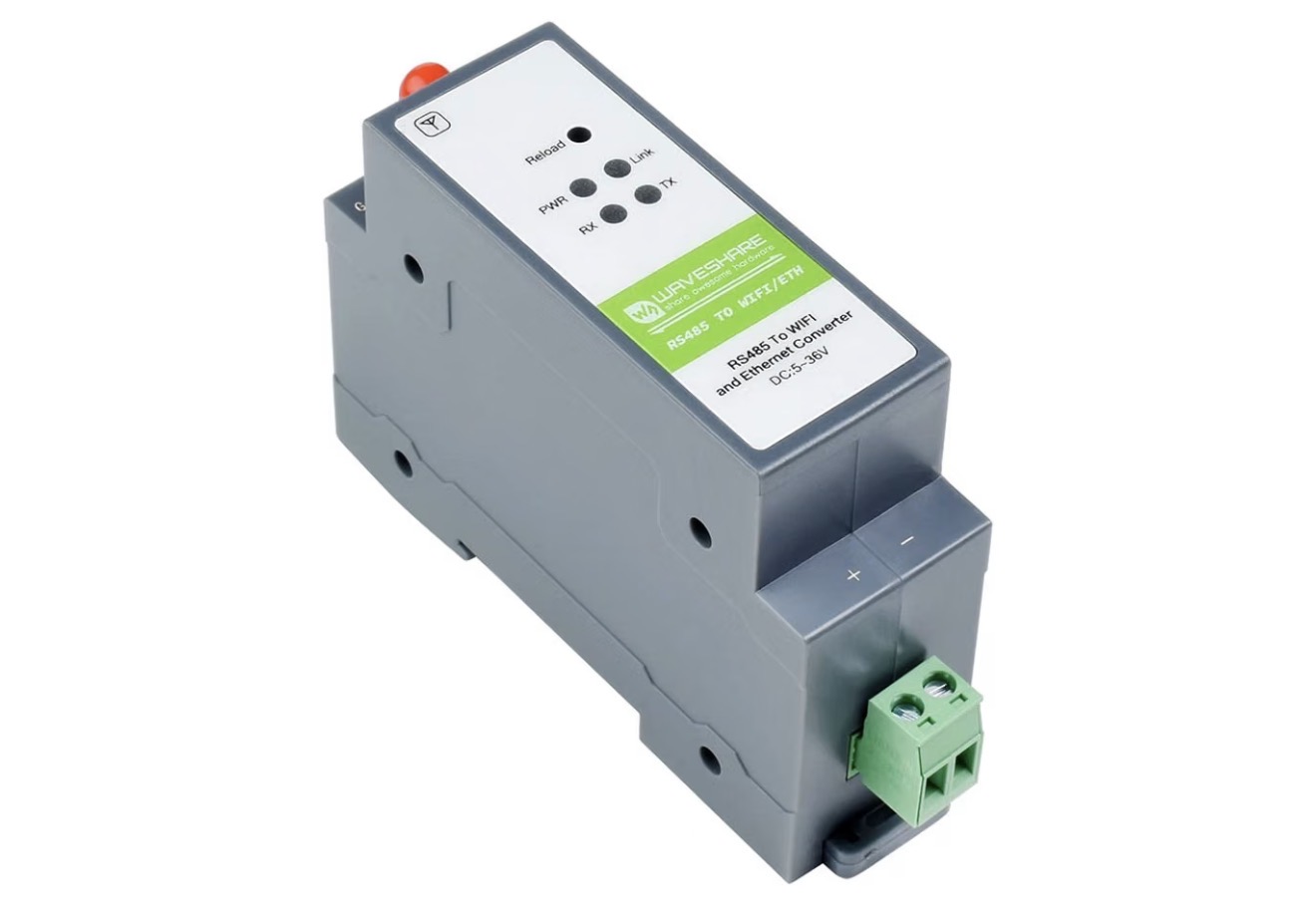
Using compatible Waveshare industrial networking hardware, Nova can establish a communication pathway to supported programmable logic controllers (PLCs).
This architecture is intended to bring authorized equipment monitoring and control functions into Nova's familiar interface.
Waveshare RS485 TO WIFI/ETHRS485, Wi-Fi and Ethernet reference hardware. Installation and PLC compatibility require validation.Manufacturer reference ↗
PLC
I/O
I/O
Representative PLC schematicIllustrative controller and I/O modules. The PLC retains programmed safety logic and equipment interlocks.
How It Works
Nova Terminal → Nova Server → Waveshare Interface → PLC → Connected Equipment
The PLC remains responsible for its programmed control logic, equipment interlocks and safety functions.
Nova provides an additional authorized interface for monitoring and requesting permitted operations.
What This Makes Possible
Display PLC equipment status within Nova.
Present operating conditions and selected process information.
Provide clearly labeled equipment controls.
Send authorized commands through validated control pathways.
Support industrial equipment monitoring.
Combine camera visibility with equipment status in one workspace.
Extend automation interfaces across authorized Nova Terminals.
A Practical Example
Imagine a facility operator using Nova to view a live security camera while also seeing the status of a gate, ventilation system, pump or other connected equipment.
Instead of moving between separate monitoring applications and control interfaces, supported functions could be presented together within Nova.
For authorized equipment operations, Nova would pass a validated request to the appropriate control system, while the PLC retains responsibility for equipment logic and protective interlocks.
The goal is simple: Bring visibility and authorized control into one interface.
PLC integration and equipment-control functions are development capabilities. Availability depends on supported hardware, validated communications, authorization, safety requirements and physical testing. Nova is not a replacement for certified safety controls.
ONE TERMINAL. CONNECTED CAPABILITIES.
Video, Automation and AI Working Together
Traditional systems often separate video monitoring, equipment control and AI assistance into different applications.
Nova is being developed to bring these capabilities together.
Capability
Nova Integration
Live video
Compatible cameras, HDMI encoders and network streams
Drone video
Compatible RTMP aerial streams
Video processing
Local FFmpeg / MediaMTX infrastructure
Remote viewing
Authorized Nova Terminals
PLC communications
Compatible industrial networking interfaces
Equipment status
Terminal-based monitoring and visualization
Automation controls
Authorized, validated PLC command pathways
AI assistance
Conversation and supported Terminal capabilities
Three Ways Nova Connects to the Physical World
Technology
Connection
Nova Capability
ZowieBox
HDMI → Network video
Live cameras and video equipment
Drone Video
Compatible RTMP stream → Nova
Live aerial video and monitoring
Waveshare + PLC
Industrial network interface → PLC
Equipment status and authorized automation controls
Three different technologies brought together through one Nova Terminal experience.
BUILT FOR REAL-WORLD APPLICATIONS
Commercial Facilities
Bring supported security video, equipment monitoring and facility controls into a shared operational interface.
Industrial Operations
Combine live equipment visibility with PLC status and authorized control functions.
Infrastructure Inspection
Use compatible drone video to support observation of bridges, buildings, industrial sites and other infrastructure.
Remote Monitoring
Access supported video and equipment information through connected, authorized Nova Terminals.
Custom Automation
Develop tailored integrations around compatible equipment, communications protocols and operational requirements.
LOCAL CONTROL. CLEAR AUTHORITY.
Designed Around Your Infrastructure
NovatonomyAI's architecture emphasizes local processing, explicit authorization and owner-controlled infrastructure.
Nova is designed to operate alongside existing equipment—not bypass its protections.
Connected capabilities are governed by Terminal permissions, configured communication pathways and the underlying equipment's safety systems.
Your equipment remains your equipment. Nova brings the interface together.
THE FUTURE OF NOVA IS CONNECTED
We're building toward an AI companion that doesn't just answer questions about the world around you.
She can help you see it, understand it, and interact with supported systems through authorized controls.
NovatonomyAI — Intelligence Connected to the Real World.
Nova Connected Systems is under active development. Demonstrated functionality, planned integrations and commercial availability vary by feature and installation.
Voice, vision, communication, and clear operator controls—together in the Nova workspace.
NOVA TERMINALINTERACTIVE WEBSITE PREVIEW
NOVAAI ASSISTANT NOVATONOMY
WEBSITE DEMO
EQ · INPUT
NOVA
Meet Nova. We've unlocked a few of her features for you to explore.
Try her live microphone EQ and watch her respond to your voice.
Your privacy matters. Microphone audio stays on your device. It's never recorded, stored, or transmitted to us.
— Nova
Ask Nova anything…
EQ OFF · microphone off
Stopped — press ENABLE
Live website controls: EQ and shared KILL / ENABLE. Other controls are a product preview. Microphone audio stays on your device; it is never recorded or transmitted.
Native Nova Terminal preview, with local microphone EQ and shared KILL / ENABLE. Other controls represent the Nova product and do not connect to a production Terminal.
01
Nova Link
Connect trusted Nova terminals.
02
Intercom
Talk with the person at the other terminal.
03
Live Voice
Talk naturally with Nova.
04
Camera
View a camera and capture a still for a specific task.
05
Live Camera
Keep ongoing live visual context available.
06
Remote Camera
View authorized remote camera feeds in the Nova Terminal.
07
Video Sources
Select compatible cameras, HDMI video equipment and RTMP sources.
08
Controls
Equipment status and authorized control requests through validated PLC pathways; availability depends on installation.
09
EQ
See a local, 20-band sound spectrum.
10
Visual Bookmark
Deliberately save a visual or context moment for later retrieval.
11
Compare to Now / What Changed?
Compare a saved visual moment with the current view and explain meaningful visible differences.
12
Watch Mode
Tell Nova what to observe and what matters. Monitor a visual condition and receive alerts on meaningful changes.
13
Point / Highlight
Temporarily highlight the object Nova is referring to in the current visual.
14
Remember
Keep useful project and workflow information available.
15
Settings
Manage the terminal and its controls.
16
STOP
End active linked and media operation.
NOVA LINK
Different terminals. One shared workspace.
Connect trusted Nova terminals for human communication, shared Nova interaction, and camera telepresence. Work together across devices without losing the context of the task.
▣YOUYour Nova terminalVoice · camera · AI assistance
↔NOVA LINKTrusted terminal connection
▣YOUR COWORKERThe other Nova terminalVoice · camera · AI assistance
PERSON TO PERSON
Talk with your coworker.
Intercom provides full-duplex communication between linked terminals. Talk naturally with the person at the other terminal; this is distinct from talking to Nova.
PERSON TO NOVA
Talk naturally with Nova.
Live Voice brings Nova into the conversation. Either linked terminal can become the active Nova conversation point.
A SHARED CONVERSATION
You + Nova + a coworker.
The active person can be heard at the other terminal while speaking with Nova, and Nova’s response can be heard across the linked session.
CAMERA & LIVE CAMERA
The right view. From either end.
Camera provides a direct interaction or a captured still. Live Camera keeps ongoing live visual context available. They use the same source rule, with different ways to work.
STANDALONE01
Your camera. Your workspace.
With Nova Link off, Camera and Live Camera use your terminal’s local camera. Front/rear controls switch your own camera where supported.
YOU → LOCAL CAMERA
NOVA LINK ACTIVE02
Their view. Nova still beside you.
When linked, either user can view the other terminal’s camera in the large main view, while Nova remains in picture-in-picture. Front/rear controls switch the peer camera where supported.
YOU → PEER CAMERA + NOVA PiP
20-BAND EQ
See the sound around you.
Local full-range sound visualization, approximately 50 Hz to 20 kHz. EQ alone does not automatically send surrounding audio to AI inference. Live Voice is a separate listening control.
Inspired by Nova's real 20-band EQ. Try the live, microphone-responsive version in the interactive Terminal above.
REMEMBER
Keep useful context close.
Keep important project and workflow information available to Nova, supporting continuity as you return to the work. No promise of unlimited or permanent memory.
OPERATOR CONTROL
A clear way to kill.
KILL
A simple, unmistakable control for ending active linked and media operation. It is a software operator control, not a certified emergency-kill or life-safety device.
WORKPLACE PRODUCTIVITY
Built to help people get more done.
Practical assistance at the point of work. Designed to help people find information, communicate clearly, and make progress on the task in front of them.
01 / KNOWLEDGE
Get to the information.
Faster access to answers, procedures, and useful project context can help reduce task switching.
02 / COLLABORATION
Bring expertise closer.
Combine remote expert conversation with a shared visual view for troubleshooting and support.
03 / ACCESS
Work beyond the desk.
Hands-free interaction and portable access across terminals keep assistance nearer to the work.
WORKPLACE SAFETY SUPPORT
Designed with the workplace in mind.
Better communication and a clearer view can support the people doing the work.
Remote visual support, easier worker communication, and information near the task may help reduce unnecessary movement into some work areas. Nova offers clear operator controls; future sensor and robotic integration remains in development.
POTENTIAL APPLICATIONS
Real environments. Practical possibilities.
Areas where visual collaboration, clear communication, and accessible information could help. These are potential applications, not claims of existing commercial deployments.
01
Field service
Bring visual context and remote expertise to the task.
02
Maintenance
Discuss equipment, procedures, and the next troubleshooting step.
03
Transportation
Support communication and access to operational information.
04
Utilities
Connect field personnel with technical support.
05
Industrial facilities
Keep useful knowledge closer to the point of work.
06
Facility management
Coordinate people and understand issues across locations.
07
Remote inspection
Share a live view with a person at another terminal.
08
Technical support
See the problem while talking through it.
09
Training & job shadowing
Let learners observe, ask questions, and follow the work.
10
Workplace communication
Move between coworker conversation and AI assistance.
WHERE NOVA IS TODAY
A working platform. A clear path forward.
CURRENT / DEMONSTRATED
Nova 5.0
A multi-terminal AI coworker, physically exercised on Windows PC, iPad, and iPhone.
Real-time voice and visual assistance
Nova Link, Intercom, and shared conversation
Camera, Live Camera, and peer-camera control
20-band EQ and continuity features
FUTURE / IN DEVELOPMENT
Nova Robot
A future physical platform direction. The robot imagery is a concept, not a currently available hardware product.
Tracked mobility and modular accessories
Expanded sensors and robotic controls
Touchscreen control and voice-assisted commands
Workplace hardware integration
TARGET LAUNCH PRICING
Clear pricing. Room to plan ahead.
Explore target pricing freely. No signup, sales call, or personal information required to understand the plans.
Target launch pricing shown for planning and market feedback. Final pricing, included AI usage, hardware requirements, taxes, availability, and plan features may change before commercial release.
Nova is not yet commercially available. Purchases and payments are not offered on this site. AI usage allowances have not yet been defined.
NOVA5.0USER MANUAL
READ EXPLORE UNDERSTAND ↗
OPEN DOCUMENTATION
See exactly how Nova works.
A closer look before you take the next step.
Explore the Nova 5.0 User Manual for a simple, step-by-step look at Nova’s current interface, features, linked-terminal operation, voice, camera, Intercom, EQ, controls, and everyday use.
This manual documents the current Nova 5.0 prototype and is provided so prospective users can see how the system works today.
ABOUT NOVATONOMYAI LLC
People + AI. A more capable working day.
NovatonomyAI LLC develops practical AI systems designed to work alongside people in real environments.
Our focus is human and AI collaboration: real-time assistance, workplace productivity, safety support, and telepresence. Nova brings those ideas into a working platform, with modular technology and robotics as future directions.
We welcome conversations with prospective users, beta testers, workplace teams, and potential partners.